 Shane Smiskol
b8bf3fc0c2
Shane Smiskol
b8bf3fc0c2
* kind of

* Revert "kind of"

This reverts commit 25abbbf1764b0f7e8fbcb83e37159ba6f8cdf641.

* more generic alert text, whenever we're waiting for navd.

* actual better comment

* update translations
old-commit-hash: d70c4916db0af3c5288034db9a361fd0aff39f7b
Multilanguage
Contributing
Before getting started, make sure you have set up the openpilot Ubuntu development environment by reading the tools README.md.
Policy
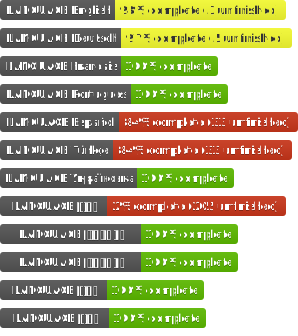
Most of the languages supported by openpilot come from and are maintained by the community via pull requests. A pull request likely to be merged is one that fixes a translation or adds missing translations.
We also generally merge pull requests adding support for a new language if there are community members willing to maintain it. Maintaining a language is ensuring quality and completion of translations before each openpilot release.
comma may remove or hide language support from releases depending on translation quality and completeness.
Adding a New Language
openpilot provides a few tools to help contributors manage their translations and to ensure quality. To get started:
- Add your new language to languages.json with the appropriate language code and the localized language name (Traditional Chinese is
中文(繁體)). - Generate the XML translation file (
*.ts):selfdrive/ui/update_translations.py - Edit the translation file, marking each translation as completed:
linguist selfdrive/ui/translations/your_language_file.ts - View your finished translations by compiling and starting the UI, then find it in the language selector:
scons -j$(nproc) selfdrive/ui && selfdrive/ui/ui - Read Checking the UI to double-check your translations fit in the UI.
Improving an Existing Language
Follow step 3. above, you can review existing translations and add missing ones. Once you're done, just open a pull request to openpilot.
Checking the UI
Different languages use varying space to convey the same message, so it's a good idea to double-check that your translations do not overlap and fit into each widget. Start the UI (step 4. above) and view each page, making adjustments to translations as needed.
To view offroad alerts:
With the UI started, you can view the offroad alerts with:
selfdrive/ui/tests/cycle_offroad_alerts.py
Updating the UI
Any time you edit source code in the UI, you need to update the translations to ensure the line numbers and contexts are up to date (first step above).
Testing
openpilot has a few unit tests to make sure all translations are up-to-date and that all strings are wrapped in a translation marker. They are run in CI, but you can also run them locally.
Tests translation files up to date:
selfdrive/ui/tests/test_translations.py
Tests all static source strings are wrapped:
selfdrive/ui/tests/create_test_translations.sh && selfdrive/ui/tests/test_translations
